Surge 2.0.4 Update: New Shopify Theme Features & Customization Options
Surge 2.0.4 Update: New Shopify Theme Features & Customization Options
We’ve been collecting feedback from Surge users since launch, tracking feature requests, support tickets and areas where merchants want more control over their Shopify storefronts.
That feedback is now feeding directly into the product roadmap.
The latest Surge 2.0 Shopify theme update, version 2.0.4, introduces a collection of new customization options, usability improvements and fixes across product pages, typography, newsletters, testimonials, collections and more.
In this post, I’ll walk through some of the most useful additions.
And if you’d rather see everything being tested live inside Shopify, you can watch the complete walkthrough here:
Watch the full Surge 2.0.4 walkthrough on YouTube
First: Updating and Activating Your Surge Theme
If you’re working with multiple Surge theme files or duplicate versions of the same store, you may occasionally need to re-enter your license information after installing an updated theme file.
Inside Theme Settings, enter:
-
Your Surge license key
-
Your Shopify store URL
As long as the Shopify store URL remains the same, you can continue working across multiple theme files associated with that store.
Inside the Conversion Rate Academy, members can also access the latest theme update links, support resources and feature request options.
That feedback process is important because many of the features in this release came directly from requests submitted by Surge users.
1. New Stacked Product Variant Layouts
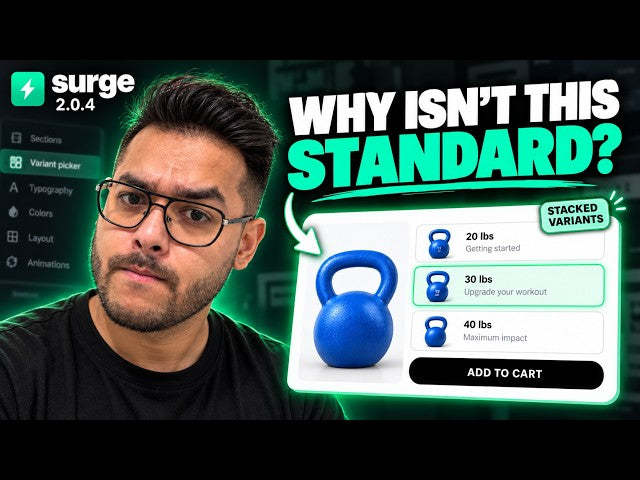
One of the more noticeable additions in Surge 2.0.4 is a new stacked variant pill layout.
Instead of presenting product options only as traditional buttons or swatches, merchants can now display variants in a larger stacked format.
This can be particularly useful when the difference between variants requires more explanation.
For example:
20 lbs
Good for beginners
30 lbs
Ideal for an upgraded workout
40 lbs
Designed for maximum resistance
You can also choose whether to display product images inside the stacked variant option and add supporting descriptions underneath each selection.
This gives merchants more room to explain why someone might choose one variant over another rather than simply showing a product name or size.
2. More Typography Control Inside Individual Sections
Typography plays a major role in how polished a Shopify store feels.
One request we received was greater control over mixed typography inside individual headlines.
Surge 2.0.4 now gives merchants more control over bold text, font families and styling at the individual section level.
That means you can create headlines where one part uses a serif font while another uses a sans serif font.
For example:
What people are saying
You can customize:
-
Standard text font
-
Bold text font
-
Bold text color
-
Font weight
-
Section-specific typography
This makes it easier to create more editorial or premium-looking layouts without needing custom CSS.
Important: Switch From Theme Default to Custom
One setting worth remembering is the difference between Theme Default and Custom.
If a section is using the global theme settings, changing the individual font settings inside that section may not appear to do anything.
Switch that section to Custom, and the dedicated typography controls become available.
This applies to several of the more advanced customization settings throughout the theme.
3. Improved Newsletter Section Customization
The newsletter section has also received a substantial customization upgrade.
You can now add a background image and control how that image behaves across desktop and mobile.
Settings include:
-
Desktop background image
-
Mobile background image
-
Image position
-
Image fit
-
Background overlay
-
Typography
-
Form field background
-
Form border color
-
Input text color
-
Button styling
-
Button borders
-
Section padding
The new overlay control is especially useful when using photography or detailed imagery behind newsletter copy.
Adding a subtle overlay can improve text readability without having to edit the original image.
4. More Control Over Featured Product and Collection Cards
Product cards are another area where merchants asked for more flexibility.
The latest update gives you greater control over:
-
Product card alignment
-
Product title sizing
-
Pricing
-
Compare-at pricing
-
Card backgrounds
-
Button height
-
Button padding
-
Review visibility
-
Mobile typography
-
Color swatches
-
Secondary images on hover
This becomes especially useful when trying to make a featured collection feel consistent with the rest of your brand.
You can also remove review displays entirely where they aren’t needed.
5. More Control Over Testimonial Card Styling
Testimonial sections now include additional controls for card and image styling.
Previously, some of the corner radius settings were more restricted.
Surge 2.0.4 expands that control so merchants can adjust things such as:
-
Testimonial card corner radius
-
Testimonial image radius
-
Card shadows
-
Card colors
-
Layout
-
Spacing
-
Typography
That means testimonials can now better match the overall visual language of the store rather than feeling like a separate component.
6. Custom Font Controls for Buttons
Button typography now has more flexibility too.
Instead of every CTA relying exclusively on global button typography, individual sections can use their own button font settings.
For example, your primary site buttons might use one font while a campaign-specific landing page uses something more editorial.
Again, the key is switching the section from Theme Default to Custom before changing those settings.
7. Quantity Selectors on Featured Products
Another useful addition is the ability to add a quantity selector directly to featured product sections.
Instead of forcing someone to visit the full product page before choosing quantity, you can allow them to select the number of units directly from the featured product block.
To enable this:
-
Open the featured product section.
-
Enable the variant options if needed.
-
Set the primary button behavior to Add to Cart.
-
Enable Show Quantity Selector.
-
Customize the quantity selector styling.
You can then adjust settings such as the number size and plus/minus button sizing.
For products that are commonly purchased in multiples, this can create a faster buying path.
8. Custom Fonts Inside Product Accordions
Product information can be displayed using either tabs or accordion blocks.
One recent user request was the ability to control the typography specifically inside the accordion.
That option is now available.
Merchants can select different font families for accordion titles and content, making it easier to maintain the same visual style across the rest of the product page.
9. Editable “Verified Buyer” Text
Another smaller but useful improvement is the ability to customize the Verified Buyer text used within review displays.
Previously, this text was more fixed.
You can now change it to language that better fits your brand.
Because the text is configurable, it can also be recognized by compatible translation apps for multilingual storefronts.
Built From Merchant Feedback
One thing I want to emphasize about these updates is where many of them come from.
We track support conversations, feature requests and bug reports from Surge users.
When someone asks for a feature and it makes sense within the scope of a Shopify theme, it gets considered for the roadmap.
There is an important distinction here.
Some functionality naturally belongs inside a Shopify theme.
Things like:
-
Typography controls
-
Product sections
-
Variant layouts
-
Comparison tables
-
Testimonials
-
Cart presentation
-
Landing page sections
-
Visual merchandising
Other functionality belongs inside dedicated applications.
For example:
-
Subscription billing
-
Review collection systems
-
Email marketing
-
Customer support platforms
The goal isn’t to turn Surge into every Shopify app imaginable.
The goal is to keep improving the storefront layer while maintaining the fundamentals that matter most: customization, usability, SEO and conversion-focused design.
Watch the Full Surge 2.0.4 Walkthrough
There are a lot of smaller settings and customization options that are easier to understand once you see them being used directly inside the Shopify theme editor.
In the full video, I walk through the update live and test many of the new features in real time, including:
-
Stacked variant layouts
-
Variant descriptions
-
Mixed typography
-
Custom font controls
-
Newsletter backgrounds and overlays
-
Product card customization
-
Testimonial styling
-
Quantity selectors
-
Accordion typography
-
Review text customization
If you’re currently using the Surge 2.0 Shopify theme, I’d recommend watching the full walkthrough before you start exploring the latest theme file.
Watch the full Surge 2.0.4 Shopify theme update walkthrough on YouTube
And if there’s a feature you’d like to see added to Surge, submit it through the official feature request channel inside the Conversion Rate Academy.
The more we understand how merchants are actually building with the theme, the better we can continue improving it.